
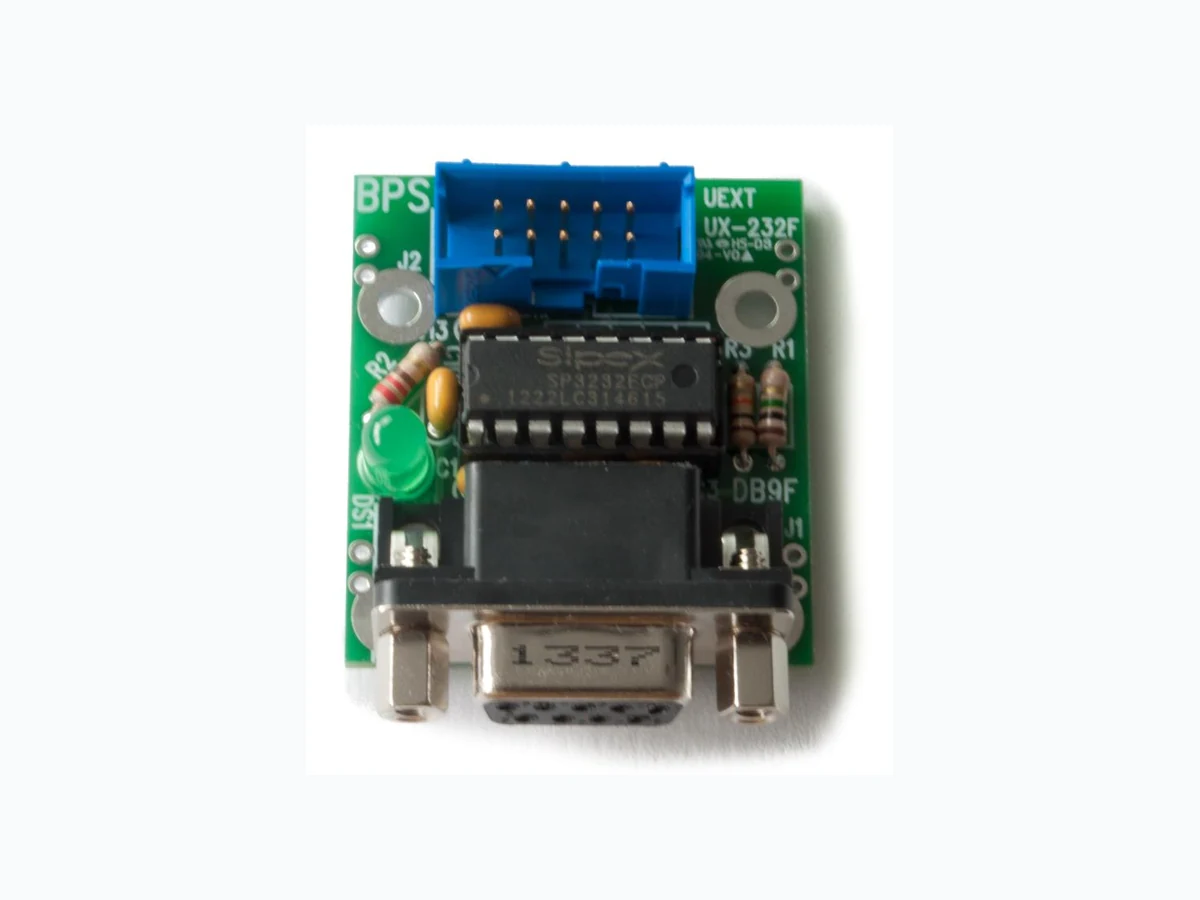
PCB-UX-232F BUSBOARD
Document overview
- Manufacturer or author: Provided By www.digicamel.com(free datasheet download site)
- PDF pages: 5
Technical content
Features
RS-232 to logic level adapter with DB9F connector (DCE style) and power LED. Tx and Rx drivers provided. UEXT standard 2x5 header pinout for interchangeable serial interface modules with drivers for Tx and Rx provided. Bare PCB only (unpopulated, no parts provided). BOM and schematic available for download. All thru-hole construction allows for easy assembly. Using a DIP IC socket provides easy IC replacement. Double-sided, FR4 glass-epoxy PCB, 1oz/ft2 copper, anti-tarnish coating. Soldermask & silkscreen. Lead free and RoHS compatible. DB9 connector can be replaced with a 2x5 shrouded header for use with ribbon cable connectors.
BusBoard Prototype Systems - Built for designers Details The PCB-UX-232F is a bare PCB to build the UX-232F logic-level to RS-232 adapter. This is an unpopulated board and no parts are included. The BOM (bill of materials) and schematic diagram are available at http://www.busboard.us/products/PCB-UX-232F/ to construct the circuit. Soldering is required and prior experience with electronic assembly is recommended. A PCB soldermask helps prevent solder bridges on tracks and a silkscreen legend provides part locations. The UX-232F provides a DCE RS-232 serial port with a DB9 female connector. Drivers are provided for the Tx and Rx lines with the other port lines unconnected. All thru-hole construction allows for easy assembly, maintenance, and modification. A DIP IC socket can be used to allow easy IC replacement to use different voltage/feature parts or to replace damaged parts. The UX-232F uses the UEXT standard for interchangeable serial interface modules. UEXT is an open standard developed by Olimex providing 3 Volt I2C, SPI, and USART signals on one connector. A 10- pin ribbon cable is used to connect to UEXT peripheral boards. It can be plugged into microcontroller dev boards with UEXT headers. A power LED provides a visual indication of power status. It can be used with several different RS-232 converter ICs using the MAX202 or MAX3232 16-pin DIP pinout. The Exar SP3232ECP-L is recommended to support both 3V and 5V operation, and it provides ESD protection. We recommend you use a socket for the driver IC so it can be easily replaced if they are damaged. UEXT Module Attached to the STM32-F3U Discovery-F3 BaseBoard
BusBoard Prototype Systems - Built for designers UEXT Header The Universal-EXTension-Connector (UEXT) is an expansion connector standard created by Olimex Ltd. (www.Olimex.com). It provides an asynchronous serial port (USART), SPI and I2C all on the same connector. Peripheral modules for UEXT are available from Olimex (and stocked at www.Mouser.com) as well as from other suppliers. The UEXT interface standard uses a 2x5 polarized header with 0.1” spacing. Modules connect to the UEXT connector with a 10-pin ribbon cable. The UEXT pinout is as follows: Direction Signal Function Pin Pin Signal Function Direction Output +3.3 Volts 1 2 GND - Output from MCU USART-TX 3 4 USART-RX Input to MCU Output I2C-SCL 5 6 I2C-SDA Bi-directional Master In Slave Out SPI-MISO 7 8 SPI-MOSI Master Out Slave In Master Out Slave In SPI-SCK 9 10 SPI-SSN Master Out Slave In MCU = the microcontroller All signal levels on this header are CMOS logic levels. Pins 5-10 Not Used on UX-232x modules. The UX-232x adapters can be used for 3.3V or 5V operation, but most development boards only provide 3.3V on UEXT headers. Most UEXT modules are designed for 3.3V operation only. Olimex UEXT Connector Pins
BusBoard Prototype Systems - Built for designers DB9F (DCE) Connector (J1), RS232 Levels DTE devices use a DB9 male connector while DCE devices use a female connector. Some equipment does not follow this convention. The UX-232F adapter uses a DB9 female connector. DB-9 Female Connector Pin Numbers For DCE Devices It connects DB9 male connector. Note that pin 1 is on the opposite side. DB-9 Male Connector Pin Numbers For DTE Devices The signals on the pins are shown in the table below. Note that the signal names for a pin are the same for both DTE and DCE connectors. For example, TX is an output on the DTE connector and an input on the DCE connector. DTE (Computer), Male DCE (modem), Female Signal Name Pin Number Direction Signal Name Pin Number Active State Logic / RS232 DCD 1 << DCD 1 LO / SPACE (+) RX 2 << RX 2 HI / MARK (-) TX 3 >> TX 3 HI / MARK (-) DTR 4 >> DTR 4 LO / SPACE (+) GND 5 -- GND 5 - DSR 6 << DSR 6 LO / SPACE (+) RTS 7 >> RTS 7 LO / SPACE (+) CTS 8 << CTS 8 LO / SPACE (+) RING 9 << RING 9 LO / SPACE (+) Table 1 - RS-232 DB-9 Connector Signals DTE = Data Terminal Equipment DCE = Data Communications Equipment Traditionally a DTE device would be a terminal with a screen and keyboard, or a PC computer. A DCE device would have been a modem. With microcontroller projects, the terms are less obvious because the microcontroller may be the master (the terminal) or the slave communications device, or communicating with a peer. However, we keep the terminology because the RS232 standard is well established.
BusBoard Prototype Systems - Built for designers RS-232 Signal Levels The reason a RS-232 interface IC is needed is to convert the 0 and 5 Volt logic levels (or 0 and 3.3V) to the positive and negative RS-232 levels. The RS-232 voltages were selected in the days of teleprinters to help transit data reliably over long lengths of cable. The RS-232 interface converts the conventional 0 to 5 volt signal range (Low/High signals) into two states called Mark and Space. Mark is used for the negative state which is from -5 to -15 volts. It represents a logical 1 (a High signal). Space is used for the positive state which is from +5 to +15 volts. It represents a logical 0 (a Low signal). The RS-232 driver also inverts the signal so that a +5V signal is converted to the negative RS-232 (Marking) state. In Figure 2 below, the upper signal is the logic-level serial data going into the interface IC, and the lower signal is the RS-232 level signals coming out. Marking Bits Start Bit 1 1 10 0 0 0 0 Stop Bit(s) Marking Bits Start Bit 1 1 10 0 0 0 0 Stop Bit(s) -5 to -15 Volts +5 to +15 Volts
0 Volts
5 Volts
Figure 2 RS-232 Signal Levels RS-232 Data Format Figure 2 shows the transmit line voltages for an 8 bit word being sent with no parity. The signal is Marking (logic HI) when no data is being sent. When a character is transmitted, it begins with a Start Bit which is a Space. It is followed by the 8 bits of the character. The least significant bit (LSB) is sent first and the most significant bit (MSB) of the character is sent last. Finally, Stop Bit (a Mark) is sent at the end of the character. If parity is used, a parity bit is added before the Stop Bit. Figure 2 shows the binary value 00100011 being sent, which is Hex 0x23, decimal 35, which is the ‘#’ octothorpe character.